Radio Player software updates

I’ve been working on some updates on my Radio Player project after receiving a few requests.

I had originally developed the software a while back when approached by a radio station that was looking for a way to make sure a remote location (transmitter/studio) was permanently connected and that a software, rather than a hardware, solution was required in order to achieve this. the project was completed last year, but some extra functionality has been added to it recently.


The main functionality of the software is as follows:

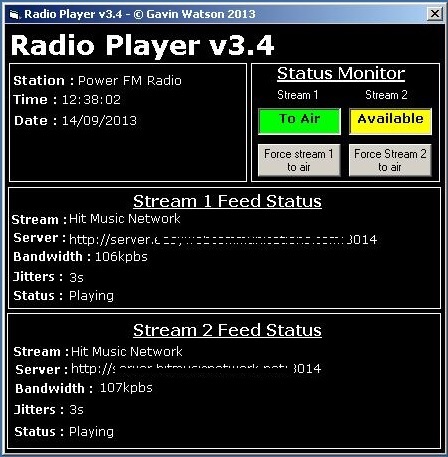
Always connected – The software connects to two streams from diverse servers and monitors their status. If there is a problem with any of the streams it will automatically switch to the other stream and attempt to reconnect to the broken stream until it makes a valid connection.

Emergency playlist – If both streams fail (network issue) then the software loads an emergency playlist of music, jingles, etc while it attempts to reconnect either stream. Once one stream is connected it will shut the emergency playlist down.

The ultimate goal of the software is to connect to a stream and stay connected permanently regardless of any disruptions, network issues, etc so there is ALWAYS an audio output from the software.

In this latest update (v3.4.2) there were a few requests for the possibility of forcing either of the streams to air. This is a feature that was not previously available to users which is now possible via the ‘Force stream’ buttons.

New features in 3.4.2:

– Force stream to air buttons
– Better visuals for which stream is currently to air and which is available
– Changes colour of displays
– Added ‘Station Name’ to config file

Radio Player


Sung jingles / adverts – Do they work?

Sung jingles / adverts - Do they work?

We’ve all heard them, but do they work? The one that will probably spring into most people’s minds is the ongoing opera singing car insurance one (in the UK).

I’ve spent all my (radio) life encouraging people not to go down the ‘sung jingle’ route, but do they actually work?

Don’t get me wrong, my feeling is that they do not, they are cheesy, corny and just sound tacky, even the ones that have been done professionally BUT they are memorable and people can easily identify the brands with them and surely this is part of what an advert/jingle is meant to achieve.

Going back to my first statement, my son, who was six at the time, told me how much he hated the car insurance advert, but could easily tell me which company the advert was for. So it works!

But does it work for the right reason? Surely advertising is meant to professionally convey your companies ‘mission statement’? Is having people mocking and laughing at your brand the right way to go about your advertising your business? Personally, I think not!

Advertising has always been a tricky one, you have a number of seconds to convey your message. Get it wrong and you have wasted a great deal of your advertising budget, get it right and it will pay for itself very quickly.

I personally remember a few clients advertising campaigns that worked very well. One of them started off on an audio cassette tape (remember them?!) and they kept the same advert for years and years, despite all attempts of getting them to change the advert (mainly because it was recorded in an analogue format) and they were having none of it! Listeners would actually complain about the advert and how long it had been running but the client refused to change it. Their argument was that it worked and they would not change it. I guess they had a valid point!

Another series of adverts that worked for a client set out to be annoying from the offset. Again, we had listeners call up and complain about them because they found them annoying BUT when we purposely asked them which advert they meant, they could easily remember the brand. Again, the adverts worked, but at what cost?

There is always that balance that is placed with the creative writers and advertising agencies… Part of their job is to get the clients brand awareness and another part is to get the mission statement across in what should be a professional manner. The advert HAS to work for the client, but where to draw the line.

So we get back to sung jingles and adverts… I would never encourage a client to have one. I personally think they sound cheesy and corny and most of the time they are really difficult to understand anyway, especially if they sing the telephone number at you!

What would I recommend? A rich clear voice-only advert that calmly and clearly gives the listener your message, no background music (or very low) with MAYBE a music jingle at the end which identifies you (like a designed logo). Your advert must obviously include your company name, your key points (what you do, what services you offer, etc…) a contact telephone number and website. That’s it…

If you have a large advertising budget you could dabble in some alternatives for brand awareness, look at the success of the meerkat

Android apps reach over 1.700 installs

I’m quite pleased to see that the apps that I developed for Canaries Media (their news and jobs websites) have now reached over 1.700 installs!

It’s always good to see that stuff you do actually getting used and this is a great example. Sure, it’s not the millions of Angry Bird app installs but it’s a start!

I’m still a bit disappointed with Apples approach to developers. Despite having gone to the trouble of registering and paying for a developers account they are still (in my opinion) very picky about what they approve and do not approve.

Both the apps that were ported from Android over to Apple were rejected which was quite a disappointment for all involved.

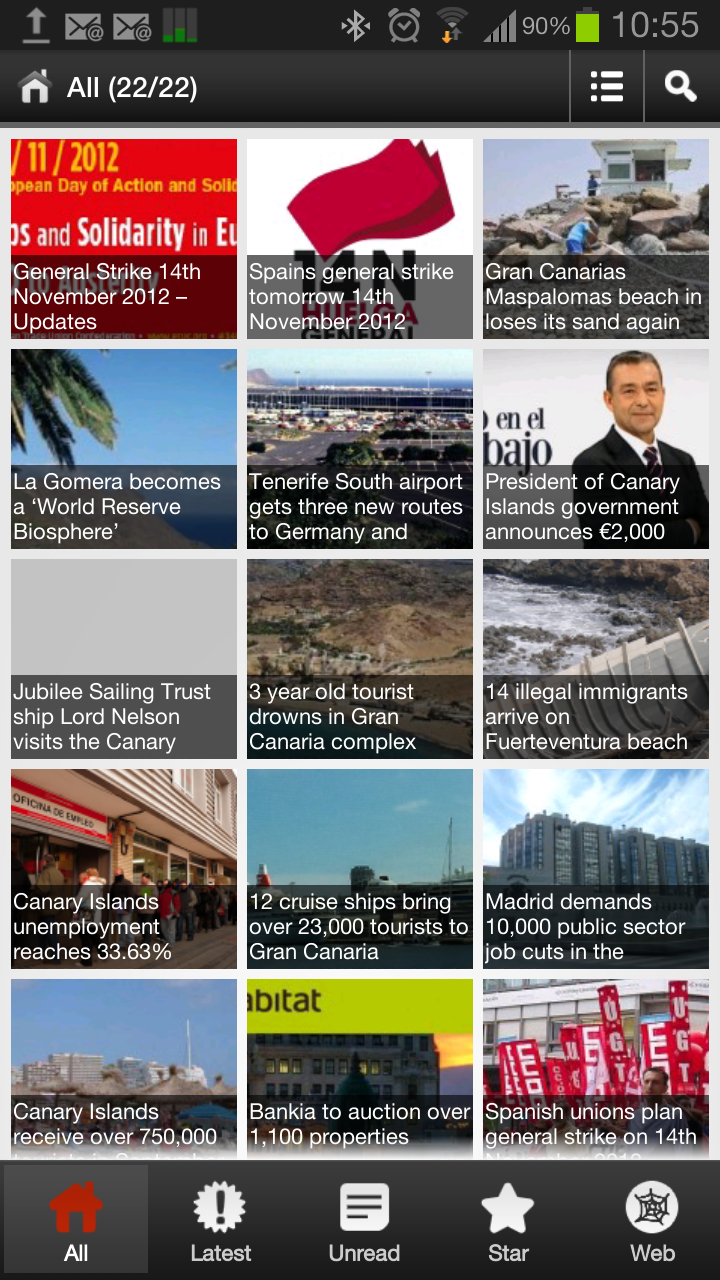
The Canaries News app drags in a feed from their main websites RSS feed and also takes care of the imagery and displays it in a nice format on the Android phones. It is presented in a tiled format with the stories image and headline. When you click on the image the full story appears. This seems to be the most popular apps of the two with people wanting to keep up to date with all the latest news from the Canary Islands. The app updates automatically when a news story is posted to the main news website. This news app also links to the clients Google Adsense account and displays Google ads via Admob in an attempt to generate additional revenue.

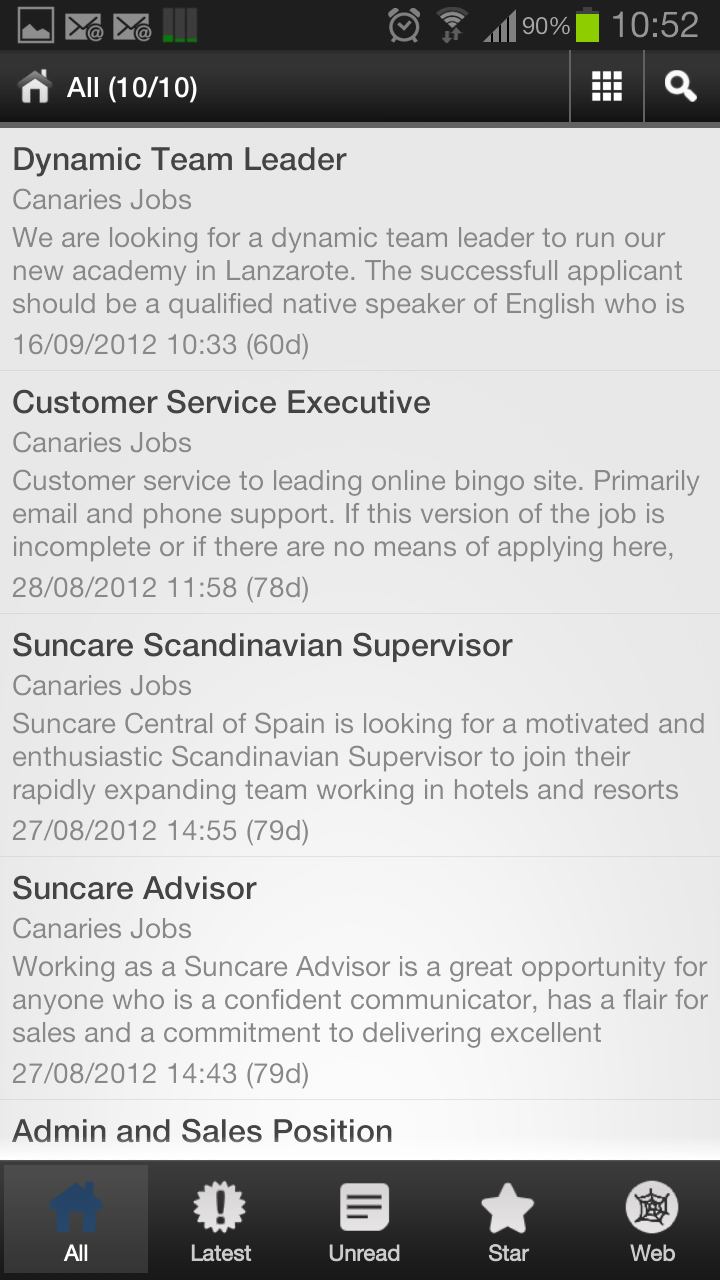
The Canaries Jobs app is very similar in functionality apart from it is presented in a different format with no images. The app updates automatically when a news story is posted to the main news website.


I’ll keep plodding on with Apple and hopefully we’ll be able to get the apps live on the Apple store some time in the near future.

If you get chance, take a look at them and install them!

Stage Names on air – Don’t do it!

It’s been a while since the first post on my radio blog in which I spoke about demo tapes and my opinion on how they should be produced and sent to broadcasters.

In this post I would like to talk about people who, for some strange reason, decide to use ‘stage names’  instead of their real names when they work in the media industry.

Why??


I have never, ever, understood why people do this!

If your name is Joe Bloggs, why would you call yourself John Smith? It just doesn’t make any sense to me! Yet I hear so many people doing it.

In most areas of the media you are selling yourself, your name, your brand. Why would you not want to promote that as much as possible? At the end of the day that is what you are selling, yourself.

I don’t know why, but it infuriates me and always has. The only thing I can think of is that people are hiding from something. What other reason could there be?

Many people starting off in the industry asked me ‘what should I call myself on air?’. My answer : ‘your name!’.

Let me give you a good example of how I had a chuckle at this…

I once had a radio presenter working at the radio station I was running, they worked at the weekend so I didn’t see them a great deal and I had to pop in to fix something and while I was there they asked me if I could sort out their wages. So we worked it all out and I dropped a cheque in for them (they were on air at the time so I just left it on the mixer console for them). I carried on what I was doing and they came back and the conversation went like this:

Presenter : I’ll have a problem with this cheque.
Me : Why?
Presenter : It’s got the wrong name on it.
Me : No it hasn’t? It has your name on it.
Presenter : That’s not my name.
Me : Well why on earth do you call yourself that then?!?!
Presenter : It’s my ‘stage name’, it’s not my real name.

I swore a little and then had a giggle…

Why on earth do people do this? You have a name, it is YOUR name, use it! Why make up another completely different name??

As another example, and I won’t give the real name of the radio presenter, but they call themselves ‘Sam Sam’. Now, why on earth would you call yourself this (their name isn’t Sam by the way, it is a made up name, but it sounds like that). I just can’t for the life of me think why they would call themselves ‘Sam Sam’? It just sounds silly. The same goes for names such as ‘DJ Flip Flop’ and things like that. It’s a shame I can’t really use real names as there are some great ones out there!

As you have noticed, people who don’t use their real name really, really annoy me!

So what is the point of this post? Surely it is not just to moan about people who use silly names on air?

No, it isn’t. Well, it is a bit!

The point of this post is to encourage you to use your real name. It is your brand and identity. You get the chance to promote yourself as much as you want and your brand (your name) is the best advertising you can get! Use it! Cut the silly ‘ Join me, Smiffy’ tag on air and just use your real name. To me, anything else just sounds silly and childish. Use your name and build up your brand and make the most of it that you can.

My name is Gavin Watson and I have never thought of calling myself anything different. On air or off air.

* Any similarity to real names is purely coincidental!

Demo tapes… My opinion

As I’ve already made some contributions on voice demos on the Internet on a number of occasions, I thought that I’d start my own ‘Radio Blog’ dedicated to this subject. By the way, when I say demo tape, I don’t actually mean a ‘cassette tape’, not that there is anything wrong with that…

Over the years I have been involved in radio, I have been sent, quite literally, hundreds of demo tapes to listen to… Everyone wanted the same thing, a job in radio.

Here are a few of my tips and tricks on how to make sure people listen to yours. Most times you only get one shot at this so if someone does actually get round to listening to your demo, you need to make sure it is going to get their attention.

Before I go about giving you ideas on what you should do, here are a few tips on what not to do. The reason I can list most of these is because all of these examples of what not to do were actually sent to me as genuine demo tapes.

Quality – I once had a voice reel demo sent to me for a job in our production studio. The quality was absolutely awful. The levels were all over the place, I’m not sure how it had been recorded, but it sounded like an old cassette player was just put in front of a speaker. This demo didn’t even warrant a reply it was that bad. What on earth was that person thinking??
If you are applying for a job in a production department, this means that you probably need to be able to edit audio, check recording levels and know what audio quality actually means. If you can’t manage that in a demo. then you don’t deserve the job, in my opinion… Audio levels need to be correct and the quality needs to be good. There is no excuse! As I said before, most times you only get one shot, don’t blow it!

Size – I’m talking MP3’s here. As a person looking for work, you need to be sending your demo to as many people as you can, right? Right! I agree with this. But imagine the flip side… Imagine your email inbox being filled up with huge email attachments on a daily basis… Imagine having to send an urgent email to someone but your email account is jammed trying to download a massive email attachment? If you are going to send an email to someone and you want to send them your voice reel, think about all of this. There are other ways of sending voice demos. Read below to find out more.

Content – One of the demo files I received once was an hour long… It was a full hour show, from start to finish. Managers/Producers do not have this amount of time to listen to a demo. It contained full songs, even adverts! Most decisions are made in the first 20 seconds of listening to the demo… If the first two minutes is filled with music and adverts, people won’t carry on listening further… Again, below I’ll try and give some pointers on what could be done better.

So, what can be done to improve these points? What can you do to make a good demo tape? Well, here is what I would have expected with a few variants depending on what type of audio demo you are sending (presenting, production, news reading, etc…).

I’ll start with how to send your demo first. As I pointed out, employers do not want their inbox clogged up with unsolicited emails with huge attachments, I clearly remember cursing people who had sent me emails with over 10MB worth of attachments that took ages to download, imagine how mad that made me if I was out and about waiting for an urgent email and was only on a 2G mobile connection?? Very mad is the answer (just in case!). What would happen in this situation is that the email would get deleted… Never to be seen again… So that could well have been your one and only chance to get noticed well and truly gone.

What you need to do is find yourself a file hosting service, a place where you can upload your audio demo and then just send a link to your audio file. This way, you are not clogging up someones inbox with huge attachments. 99% of people would prefer that you did this. Your audio demo is now only a link away, it is not a huge email file and it will be quicker to download this way rather than as an email. If you are attaching your CV, make sure that this document isn’t huge too. I’ll discuss CV’s in another post, as this is a whole different subject. If you are looking for somewhere to host your audio/video files, then drop these guys an email (tell them I sent you!), they’ll do you a cheap deal on file hosting.

OK, when you are compiling your email, remember that most of the time, your email will be unsolicited, so you will have to be courteous and preferably, slightly apologetic for sending what in some cases is seen as spam. Firstly, apologise for the intrusion and ask that if you have sent it to the wrong person, that they kindly ask who the correct person might be and if possible, forward it on? If they are the right person, again, be polite and ask them if they would be kind enough to take some of their time and have a listen to the demo you are sending them. You only have a few lines of email to actually get them to listen, make sure you don’t blow it with spelling mistakes and phrases like ‘this is the best thing you’ll ever listen to’ and ‘gizza job’. This will not work! You should also tell them that you will be following up the email in a couple of weeks, ask them if they would mind giving you some feedback on the demo? You might as well! This has two benefits, firstly, you will encourage the person to actually listen to your demo and secondly, you will get free feedback on your demo!

So, be courteous and polite and make sure there are no spelling mistakes. Do not attach huge files and make sure you attach your CV. Make sure that your email and subject clearly display your name (not JulianDJ69inthemix or something similar). Add your name to the subject and clearly label it as an ‘audio demo’. This will make it easier to search for when you email back for your feedback.

About the quality issues… Make sure that it is a good quality recording. If you are sending your demo by email, it will be an MP3 file. There is no reason whatsoever for it not being of good quality. When I mention quality I am not referring to the content, I am referring to the recording quality. Please, make sure that the levels are correct and it is not distorted or anything like that. There is no reason for not being able to make a decent quality recording. I’ll remind you again… You may only get one shot at this, make sure it is a good recording.

About the content, this depends greatly on what position you are looking for really. I’ll deal with radio presenting at the end. Let’s discuss your content if you are looking for a job as a news reader, for example. If this is the case, then what we want to hear is you actually reading the news. Mix down various demo’s of you reading different articles on different days, make it clear when you change from article to article (with a beep or a whoosh) and record different types of read (news, sports, articles, interviews, etc…) For this type of audio demo, I’d say the maximum length of your file should be no more than 3 minutes long. If you are sending a demo for production work, then give examples of your production work, such as adverts, jingles, etc… Anything that you have produced yourself. Your demo has to be of very good audio quality, make sure you take the time to give examples of only your best work.

If you are looking for work as a radio presenter, edit down one of your best shows (or different parts of various shows) but put them into the order of a full hours show. I’ll explain!
Start with a passage maybe coming out of the news/jingle with you talking and going into a song, then out of that song (or another song) with more talking, maybe throwing forward into the next part of the show or a competition, etc… If you have any content where you are talking to callers, add a bit of this, show how diverse you can be but only mix down a short part of each bit. Do not include full songs, news breaks, adverts, etc… DO NOT record a full demo that has not been taken from genuine live shows, most of the time we can tell the difference! By all means take the best bits from all your shows to put together a good demo, but do not be afraid to include anything that has a small mistake, if the demo sounds too perfect, it probably means you have recorded it ‘not live’ which won’t get you anywhere! Anyone can record a demo and edit it together until it sounds absolutely perfect, but it won’t get you anywhere in the long run!

All of this may sound like common sense and most people will read this and think ‘I already do this…’, if you already do all of this, good for you! But you would be surprised at how many people made some (or all!) of these basic mistakes and it completely ruined their chance of their demo even getting listened to.

Many of this advice assumes that you have the ability to record a demo from shows you are already doing (or have done in the past). If you have never ever done a radio show and are therefore unable to edit down an audio demo then realistically, you need to be finding someone who has access to a studio to allow you to make a recording. What you will have to do in this situation is do do a whole mock show (an hour or two show) and try and make it as realistic as possible and edit this down to make up an audio demo.

If you are looking for a radio presenter job I’d go for a demo of around 2-3 minutes in length, this should allow plenty of time for someone to get a good idea of your presentation skills, if they like you, they can ask for more…

If you are sending in your demo via tape, mini disc or CD then you might want to take the time to at least add some kind of label to the media you have sent, I remember a couple of CD’s sent it labelled ‘demo’. When there are lots of demo’s flying around, sometimes they get mislaid or we go back to them at a later time/date. Imagine if someone did this and then didn’t know who you were or how to contact you?? At least put a basic label with your name and contact details on both the media AND then case it is in. Ideally you should make up a professional label for it, it will show that you are taking it seriously.
Again, if you are sending the media in by post, make sure that you send in more than the CD, attach a copy of your CV with it and, where possible, a cover letter personally addressed to who you are sending it to.

Try and get a name of the person you are sending the material to, this also goes for sending emails. Many times people to not take the time to find out who the correct person is, this leads to emails and media getting sent to ‘the station’. This will probably not help you.

Right, that’s it for now. I hope that you find this of interest if you are thinking of submitting your audio demo to a radio station and you have found something interesting here.

I’ll be documenting much more as and when I can. Feel free to get in touch if you want, either by email or by leaving a comment below. I’ll try and answer as much as I can.

Subscribe to all future posts on my blog by entering your email address below.


Android App development

I’ve just developed a couple of Android Apps for the chaps at Canaries Media for two of their flagship websites, Canaries News and Canaries Jobs.

The design is quite simple, the App simply drags the websites RSS feed from each site and presents it onto the App.

It was interesting getting all the images to display correctly on the News App but it all seems to be working well.

Both of them seem to be doing quite well on the Android market!

You can take a look at them here:

Canaries News App
Canaries Jobs App

DTMF RDS TA Flag switch

If you need an easy and cost effective way of activating your RDS TA flag, then the EC-DTMF1 is your solution. The unit is supplied in a professional 19″ 1U rack mount box and detects a series of DTMF tones played by the studio at the beginning and end of your Traffic and Travel announcements. This is a very cost effective way of controlling the traffic (TA) flag as no other equipment is necessary (apart from your existing RDS encoder).
The unit is triggered by the studio sending the tones mixed down into the jingles directly before and after the Traffic and Travel announcements.

After receiving a valid sequence of short DTMF tones (the unit uses the standard 51# and 510 sequence to activate/deactivate), the unit will open/close a set of contacts via its 9 pin Sub-D type connector on the rear of the unit which connects to your existing RDS encoder. The audio to the unit can be supplied via either an MPX (transmission chain) or mono balanced/unbalanced (off air monitor) feed. The unit detects the standard 75ms 51# and 510 sequence of tones to operate the TA flag.

The unit also features a 3 minute timeout, should the presenter/operator/travel announcer forget to cancel the TA flag. This allows this unit to comply with the current 3 minute TA announcement limit.

A variant (EC-DTMF1C) is available in a compact non-19″ box.

EC-DTMF1 DTMF RDS TA Controller £149.95


(delivery time = approx. 1 week)
EC-DTMF1C DTMF RDS TA Controller £129.95
(delivery time = approx. 1 week)

RDS TA Flag Open
RDS TA Flag Close