
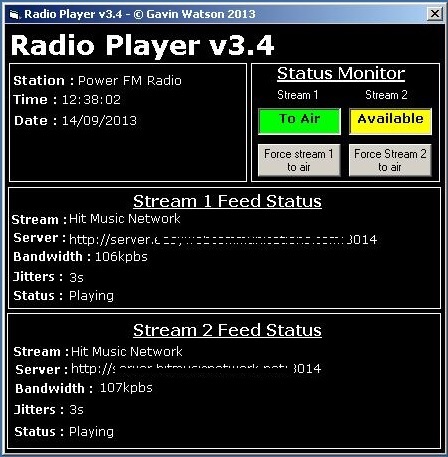
I’ve been working on some updates on my Radio Player project after receiving a few requests.
I had originally developed the software a while back when approached by a radio station that was looking for a way to make sure a remote location (transmitter/studio) was permanently connected and that a software, rather than a hardware, solution was required in order to achieve this. the project was completed last year, but some extra functionality has been added to it recently.
The main functionality of the software is as follows:
– Always connected – The software connects to two streams from diverse servers and monitors their status. If there is a problem with any of the streams it will automatically switch to the other stream and attempt to reconnect to the broken stream until it makes a valid connection.
– Emergency playlist – If both streams fail (network issue) then the software loads an emergency playlist of music, jingles, etc while it attempts to reconnect either stream. Once one stream is connected it will shut the emergency playlist down.
The ultimate goal of the software is to connect to a stream and stay connected permanently regardless of any disruptions, network issues, etc so there is ALWAYS an audio output from the software.
In this latest update (v3.4.2) there were a few requests for the possibility of forcing either of the streams to air. This is a feature that was not previously available to users which is now possible via the ‘Force stream’ buttons.
New features in 3.4.2:
– Force stream to air buttons
– Better visuals for which stream is currently to air and which is available
– Changes colour of displays
– Added ‘Station Name’ to config file
